THE CONNECTED TWIN
YOUR DIGITAL REPRESENTATION FOR OPERATIONS, PLANNING & MAINTENANCE

Your 3D model becomes a Connected Digital Twin when operational data, sensor values, and documentation sources are linked to it.
This creates a single, intuitive environment where teams can make faster, safer, and more informed decisions.

What Is a Connected Digital Twin?

A Connected Digital Twin is a visual, interactive digital representation of your real-world facilities, buildings, or infrastructure.
It combines accurate 3D models with real-time data, maintenance information, documentation, and system inputs.
This makes complex technical environments easy to understand – directly within the context of the physical asset.

Why a Connected Twin?

Faster Access to Critical Information

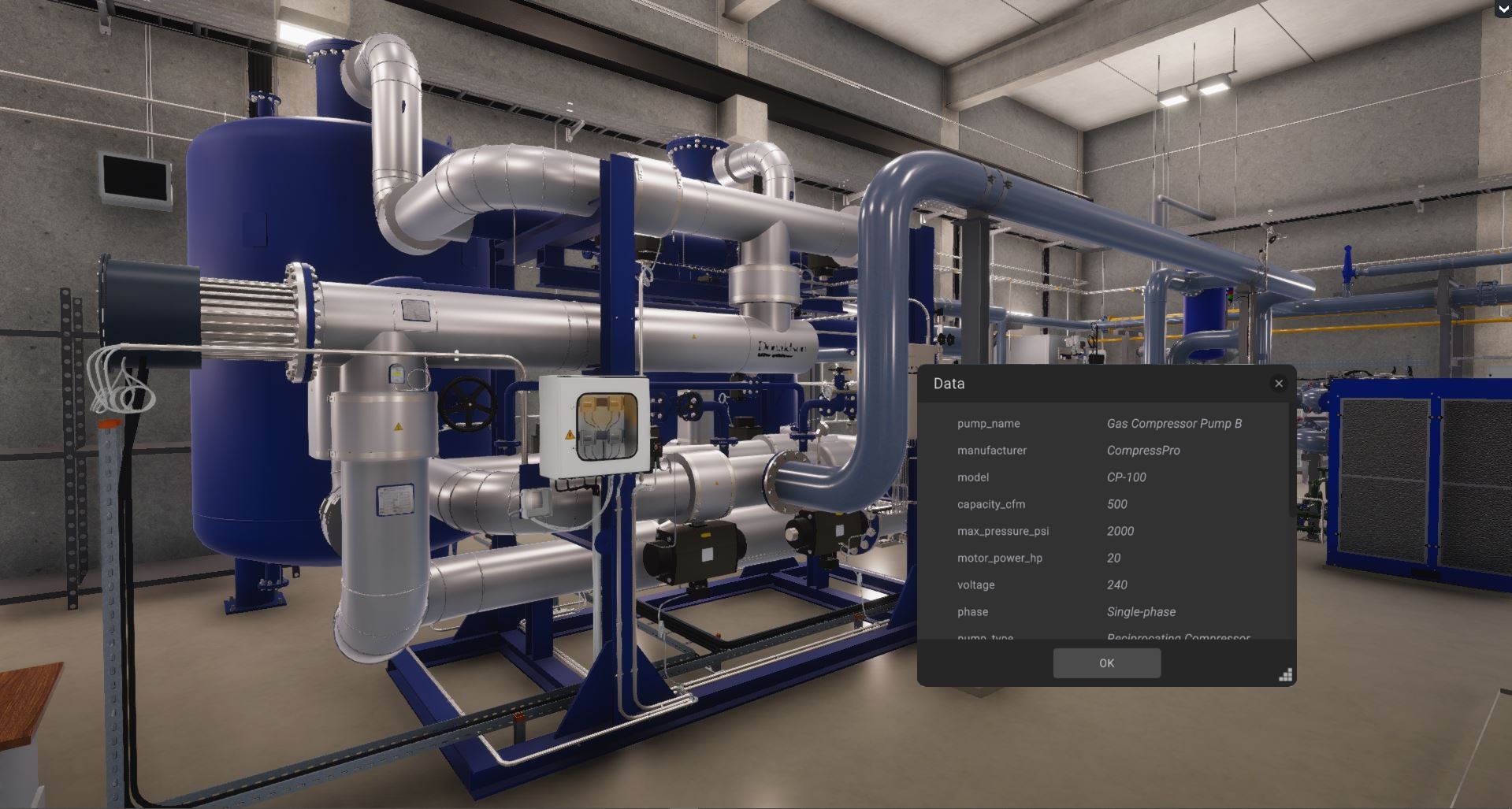
All relevant data is available directly on the asset - no system switching, no endless searching.

Transparent Condition Monitoring

Sensor, diagnostic, and operational data are visualized live within the 3D environment.

Better, More Confident Decision-Making

Teams work from a unified, up-to-date dataset - enabling faster, more confident operational decisions.

Reduced Downtime & Lower Operational Risk

Issues are identified earlier, minimizing downtime and operational risk.

Cross-Department Efficiency Gains

Operations, maintenance, planning, and facility teams collaborate within the same digital environment.

Work More Efficiently With an Intuitive Interface

The Twin saves time, reduces errors, and makes essential information instantly accessible.

How Is a Connected Twin Created?

Step 1 – Create or Import the 3D Model

BIM, 3D modeling, or Scan-to-BIM serves as the visual foundation of the Twin.

Step 2 – Connect Data Sources

IoT, SCADA, sensor data, maintenance systems, and documentation are integrated via the Twin Connector.

Step 3 – Use the Twin

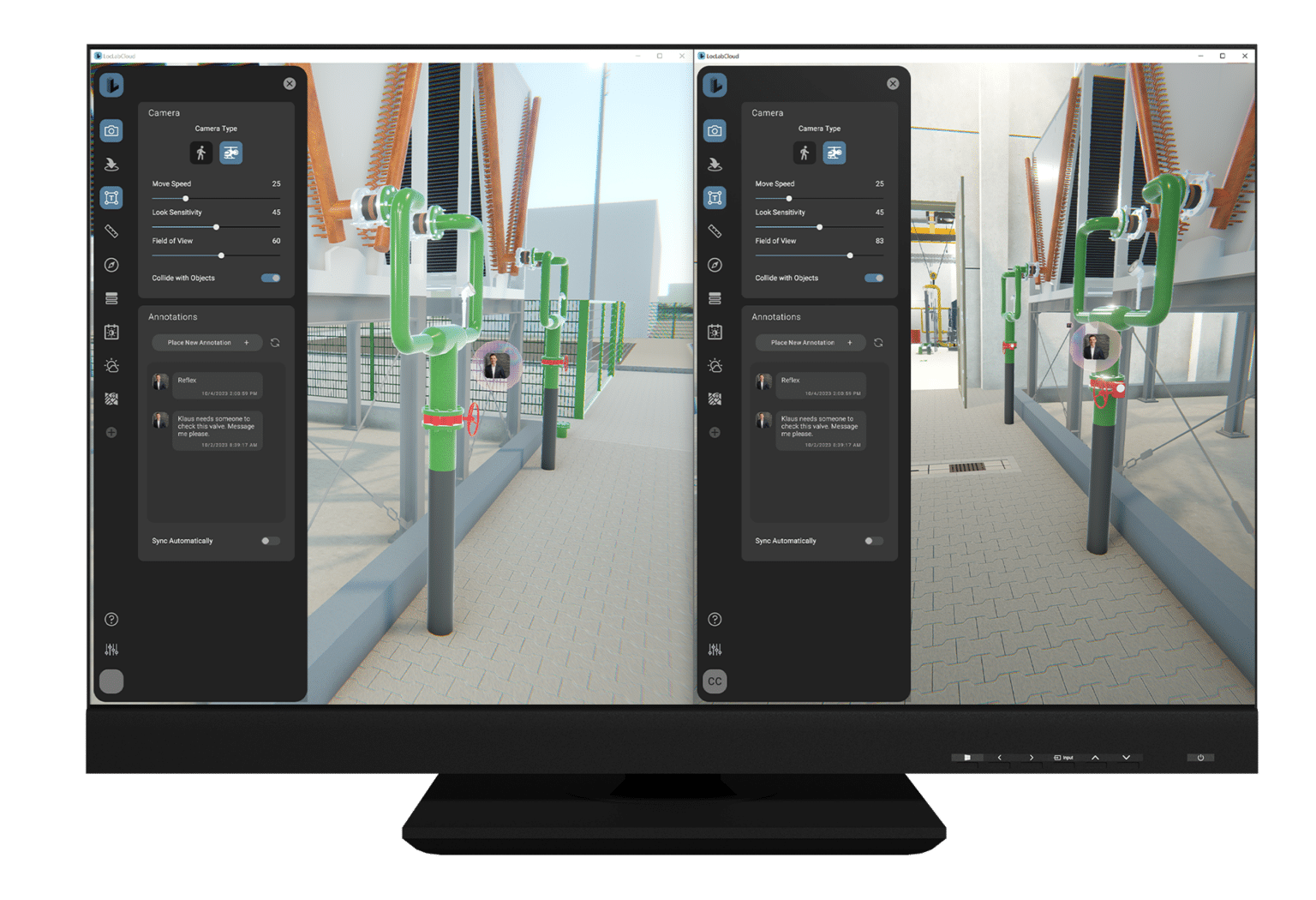
In the browser, on desktop, or in VR/AR—navigate your facility and access all relevant information directly within the model.

Which Industries Benefit Most from a Connected Twin?

Nearly every industry can benefit from a Connected Digital Twin, but most of our active deployments are in the following sectors:

Rail & Infrastructure

Digital issue management, inspections, and complete asset visibility.

Energy & Utilities

Condition monitoring, documentation, and operational oversight for complex systems.

Industrial & Manufacturing

Fast diagnostics, process visibility, and contextualized operational data.

Real Estate & Facility Management

Maintenance, documentation, and asset tracking directly at the point of use.

What Makes the LocLab Connected Twin Unique?

  • Highly realistic, navigable 3D models – not abstract data dashboards
  • No coding required – data-ready through the Twin Connector
  • Open integration for IoT, SCADA, sensors, documents, and maintenance systems
  • Use it anywhere: viewer, LocLab Cloud, or on-premise
  • High performance—even for large infrastructure and industrial sites
  • Models are created “twin-ready” for seamless connectivity

How Teams Use the Connected Twin

Virtual Walkthroughs for Analysis & Coordination

Review facilities digitally, analyze spaces, and align decisions without needing onsite visits.

Access Maintenance & Service Records Inside the Model

Open inspection reports, images, incidents, and maintenance history directly on the asset.

Interpret Live Data in Spatial Context

Sensor and operational data are displayed in 3D—making anomalies easier to detect and evaluate

Detect, Locate & Prioritize Issues

Failures and alarms can be identified and prioritized directly within the 3D environment.

Make Faster, More Visual Decisions

Complex information becomes visually clear, enabling quicker, more confident decision-making.

Visualize & Optimize Processes and Safety Procedures

Workflows, paths, and safety zones become transparent - ideal for operations, planning, and training.

Ready to bring your facilities, plants, or infrastructure fully into the digital world?

We guide you step-by-step on your path to a Connected Digital Twin.

FAQs

A standard 3D or BIM model provides a geometric and informational view of an asset, but it is typically static.
A Connected Digital Twin, on the other hand, links the 3D environment with live data—such as sensor values, maintenance records, operational systems, and documentation.
This transforms the model into an interactive, real-time decision tool that helps teams detect issues earlier, understand context faster, and work with a single source of truth across departments.

A Connected Twin can aggregate data from a wide range of IT and OT systems, including:

  • IoT sensors and smart devices
  • SCADA and control systems
  • Maintenance and work-order platforms (CMMS/EAM)
  • Inspection reports, photos, and documentation
  • ERP, GIS, and asset databases
  • Live telemetry and condition-monitoring systems

Through connectors and open APIs, the Twin becomes a unified interface for visualizing all asset-related information.

No. BIM data is helpful but not required.
A Connected Digital Twin can be built from:

  • Existing 3D models
  • Reality capture (e.g., laser scans, point clouds)
  • CAD layouts
  • Legacy documentation
  • Newly created digital models

If no usable model exists, we can generate one through 3D modeling or Scan-to-BIM workflows.
This ensures organizations at any digital maturity level can adopt a Twin.

Teams use the Twin to navigate facilities digitally, access asset information instantly, analyze conditions, and collaborate more efficiently.
Common daily uses include:

  • Locating assets and equipment in context
  • Reviewing maintenance history and documentation
  • Visualizing real-time sensor and performance data
  • Prioritizing alerts and operational issues
  • Supporting remote inspections and virtual walkthroughs
  • Providing clear visuals for decision-making meetings

The Twin becomes a shared operational interface for field teams, engineers, technicians, and management.

A Connected Digital Twin improves operational reliability and reduces downtime by making information accessible exactly where teams need it.
Key advantages include:

  • Faster troubleshooting through contextualized data
  • Improved maintenance planning and resource allocation
  • Earlier detection of anomalies and equipment risks
  • Less time spent searching for documents or system logins
  • A unified, asset-centric view across multiple departments

This leads to safer operations, more efficient workflows, and better long-term asset performance.

Getting started requires only two components:

  1. A digital model (3D, BIM, or created from scans/CAD), and
  2. Access to relevant operational data sources (live or static).

From there, integrations can be added gradually.
Most organizations begin with a simple use case—such as documentation or virtual walkthroughs—and expand toward real-time monitoring, maintenance workflows, and full operational integration.